


Dental enquiry tracker: an on-page example and booking maths
Build a dental enquiry tracker with clear IDs, owners, stages and next actions. Use the visible example to calculate a consistent booking rate.

Published by Dr Sim Raiyat
Clinical Director, Dentorb — Private General Dentist

A useful dental enquiry tracker answers three questions: who owns this enquiry, what happens next and what outcome has been confirmed? Start with those fields, then add only what the team needs to run and review the process.
The examples below are complete on the page. Use fictional records to design the workflow, then agree the appropriate system, access and privacy arrangements before recording real information.
Choose fields people will use consistently
| Field | Purpose | Example entry |
|---|---|---|
| Stable enquiry ID | Connect updates to one record | ENQ-104 |
| Created date | Put the enquiry in the right reporting group | 1 October 2026 |
| Source | Record the agreed attribution | Website form |
| Owner | Name the next-action owner | Reception role or authorised colleague |
| Current stage | Show confirmed progress | Appointment offered |
| Last meaningful contact | Explain what has actually happened | Reply received on 3 October |
| Next action and due date | Make open work actionable | Confirm chosen time on 5 October |
| Booking and attendance dates | Keep the events separate | Booking confirmed; attendance pending |
| Closure or exclusion reason | Explain why active work ended | Declined, duplicate or other factual reason |
Define “contact” before reporting it. An automated acknowledgement or unanswered call is different from a useful exchange. The full enquiry-to-booking workflow explains how the conversation moves between stages.
Do not fill a general tracker with clinical narratives or copies of patient documents. Store necessary operational references in the appropriate approved system. The ICO's data-minimisation guidance explains the purpose-based boundary.
An on-page handover example
This fictional view is taken on 5 October 2026. It illustrates structure, not real patient records.
| ID | Source | Stage | Owner | Next action |
|---|---|---|---|---|
| ENQ-101 | Website | In conversation | Team member A | Answer availability question today |
| ENQ-102 | Phone | Consultation booked | Team member B | Send agreed joining information |
| ENQ-103 | Social message | Closed: declined | Team member A | No further sales follow-up |
ENQ-102 should also carry its actual confirmed booking date in the record. ENQ-103 remains part of the original enquiry group even though it did not book. Removing it would make the booking rate look better without changing the outcome.
Handle duplicates without losing history
If the same person sends a form and later calls about the same request, review whether those are one enquiry under your agreed definition. Link or merge the duplicate through the supported process while retaining source history and any relevant contact preferences.
Do not merge on a name alone. Different people can share names, addresses or contact details. Where the match is uncertain, send it to an authorised person rather than risking a wrong-record join.
Keep the submitted count and the valid unique count distinguishable. A duplicate exclusion should be explainable, not a deleted row nobody can reproduce.
Calculate a booking rate for the same group
A cohort is the group created during a defined period. Say you review a fictional cohort of 20 valid unique enquiries created from 1 to 7 October. Eight had confirmed consultation bookings by 14 October.
Booking rate at that review date = 8 ÷ 20 × 100 = 40%.
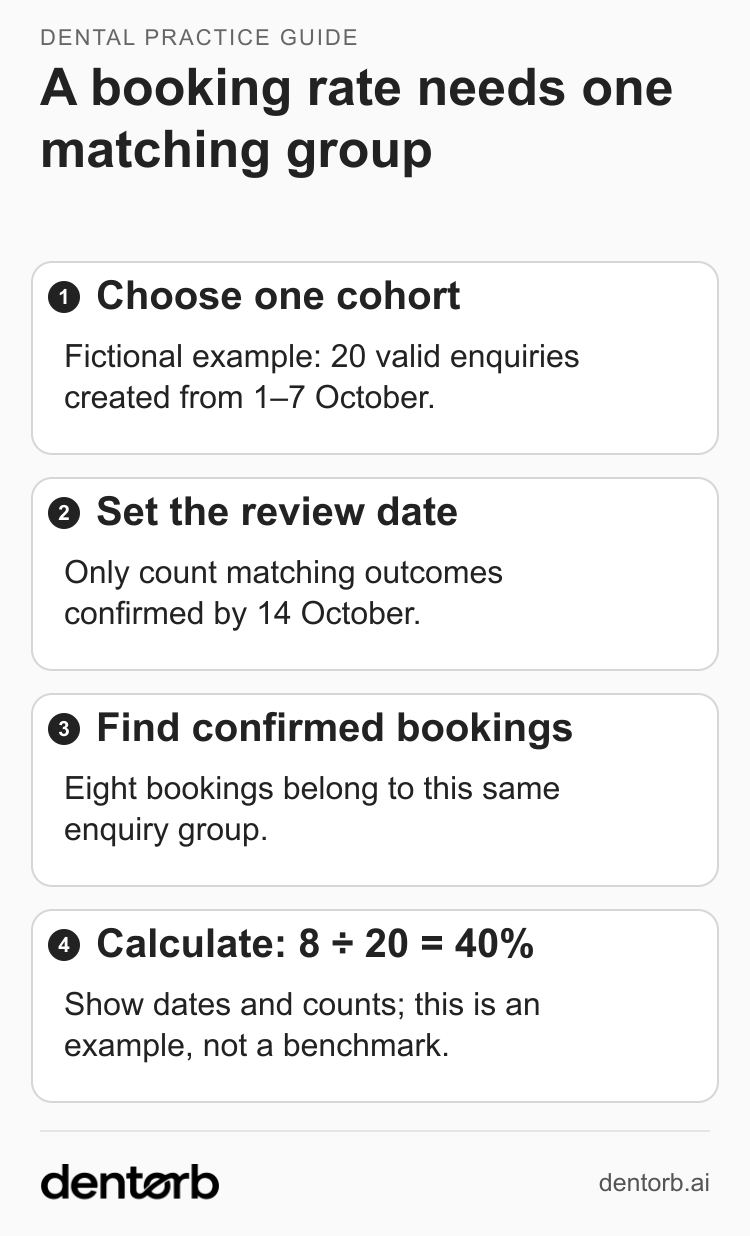
Illustrative only. State the cohort dates and review date; do not mix in bookings from other enquiry groups.
The numerator and denominator belong to the same group. Counting all appointments booked during October over enquiries received that week would mix different groups and answer a different question.
Record cancellations separately. If one of the eight later cancels, a report of “ever booked by 14 October” and a report of “currently booked on 16 October” can legitimately differ. Label the measure; do not silently switch between them.
If there are no valid enquiries, display “not available — no enquiries in this group”. Keep rates alongside counts, especially for small groups. Use the lead-quality scorecard when comparing source costs and later outcomes.
Make the shift change a useful check
At handover, inspect unassigned enquiries, overdue actions and open records without a next step. The incoming colleague should see the outstanding question without reading every conversation from scratch.
Test an enquiry created on the last day of the period, a booking after the review date, a duplicate through another channel and a closed record that replies again. The inbox comparison guide provides a practical handover test.
Check the supported Dentorb workflow
Dentorb's leads pipeline describes an owner, stage and next task. Confirm which fields, exports and source definitions your setup supports, and how booking changes reach the clinical PMS. Do not assume the tracker is a full patient record or that every PMS connection works the same way.
Bring the fictional rows and the 20-enquiry calculation to a demo. Ask a colleague to reproduce the 40% result and find the next action for every open record. If they can do both, you have a useful foundation to build on.